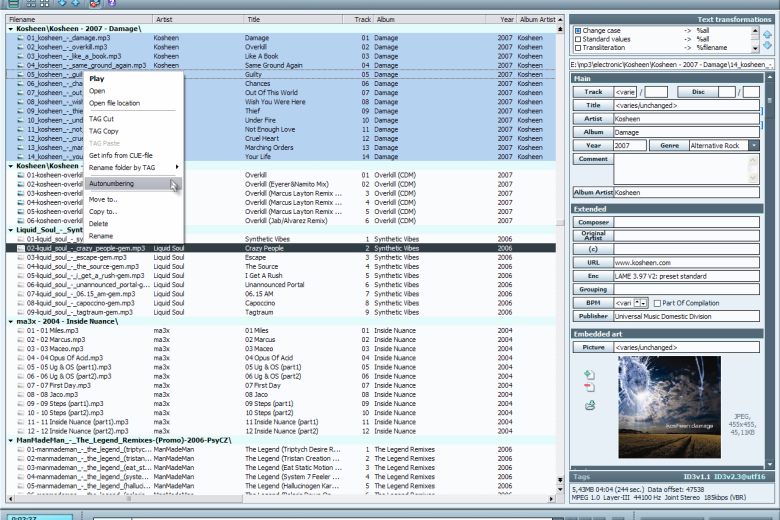
TagScanner is a versatile tag editor that makes it easy to organise your music collection.
The program can automatically tag your audio files by working with file and folder names, or online databases (Freedb, Tractype, Amazon, Discogs).
Unusually, it’s also able to work in the other direction, renaming files based on tags and other information. So if you currently have thousands of tracks that follow, well, no consistent naming structure at all, then this will fix the problem in just a minute or two.
And the program is compatible with all the standards you need. It can handle embedded lyrics and cover art. The program understands a wide range of tag types: ID3 1.0/1.1/2.2/2.3/2.4 tags, APE v1 and v2, Vorbis Comments, WMA tags and MP4(iTunes) metadata. And there’s support for MP3, OGG, Musepack, Monkey’s Audio, FLAC, AAC, OptimFROG, SPEEX, WavePack, TrueAudio, WMA, and MP4 files, with a built-in audio player allowing you to listen while the program works.
Verdict:
A versatile, full-featured audio tag editor
(1)
Audio, Video & Photo
Specifications
Requirements
Changelog
Version 6.1.21 brings (changelog):
– New: Function $sotrmulti to sort values inside one field
– Improved: More compatible indexed mp4 genres
– Improved: Extended format info from Discogs
– Improved: Duplicate search now save settings
– Fixed: Unicode processing after Discogs update
– Changed: VERSION field no longer mapped automatically to REMIXEDBY for Vorbis comments
– Updated ALAC format support
– Translation: Czech, Italian, Bulgarian, German
Deal of the Day
-21%
MAGIX Music Maker 2020 Premium
Create, record, remix, edit and share your own music