Icons brighten up Windows, but they also serve a more practical purpose in helping you to identify folders from files, and different types of file from each other. If you’re unhappy with the icons associated with various parts of your PC, though, you’ll be glad to know it’s possible to change them. You can choose from icons already present elsewhere on your system, or design your own.
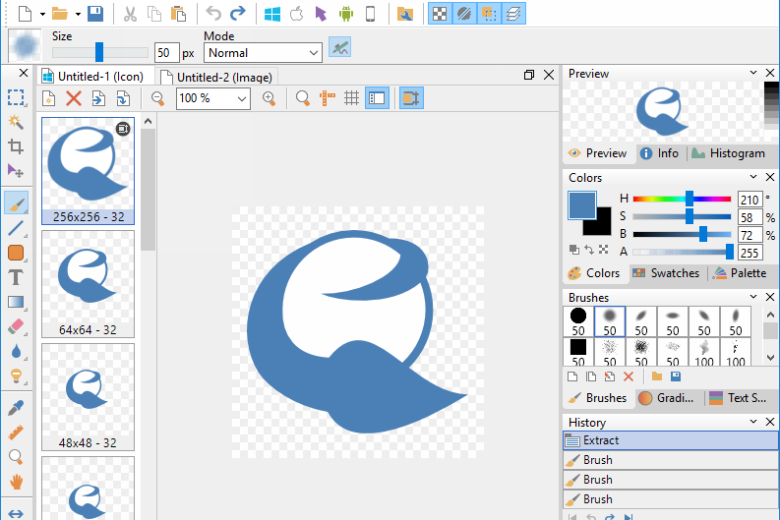
When it comes to creating your own icons, your first port of call might be your image editor. While most have some limited support for icons, you’ll find things a lot easier if you use a dedicated image-editing tool. And when it comes to freebie icon editors, IcoFX is one of the best. It allows you to work with icons for both Windows and Macintosh, supports image transparency (to allow your icons to blend neatly in with the background) and can be used to create icons up to 256×256 pixels in size.
You can create your icon from scratch easily enough using the simple grid to fill in your pixels, or you can extract existing icons from other files (such as program files or DLL files). You can even create icons from existing images or use IcoFX’s built-in screen capture tool to grab the image you need.
The program bends over backwards to give you all the tools you need to complete the job with the minimum fuss – over 40 effects can be applied to your icons to brighten them up, and you can export your finished icon in a number of formats, including both Windows and Macintosh system icons and even favicons for your website or blog.
Verdict:
IcoFX has all the tools you need to create your own stunning set of icons without the need for too much artistry or hard work on your part, but the new price will put many people off.
Operating Systems:
Attila Kovrig
Free
8.85 MB
Specifications
Requirements
128MB RAM, 600MHz processor
Changelog
What’s new in 3.9 (see changelog for more)?
– Support for PNG clipboard format
– Added “Tools/Copy Image as base64” menu item
– Added “Tools/Get Favicon” menu item to get the favicon of a web site
– Added option to save a default author for ani files
– [Fixed] Shapes not displayed when the decimal separator was not the dot
– [Fixed] 256×256 animated cursor is not saved correctly
– [Fixed] Form position is not restored at startup if themes are used
– [Fixed] updated to libwebp 1.3.2 that fixes the vulnerability CVE-2023–5129
– Enhancements and bugfixes
Deal of the Day
-25%
Xara Photo & Graphic Designer 16
A one-stop photo editing, illustration and design tool